Ergonomics for the Remote US Worker: 5 Must-Have Setup Adjustments for 2026
The landscape of work has undergone a seismic shift, with remote work firmly establishing itself as a permanent fixture for millions across the United States. As we look towards 2026, the initial novelty has worn off, replaced by a critical understanding of the long-term implications of our home office setups. What was once a temporary solution has become our daily reality, and with it, the undeniable need for optimal remote work ergonomics. This isn’t just about comfort; it’s about sustained health, productivity, and preventing chronic issues that can arise from poorly configured workstations.
For the US remote worker, the stakes are particularly high. Without the standardized equipment and regular assessments often found in traditional offices, individuals bear a greater responsibility for their own ergonomic well-being. The consequences of neglecting this can range from nagging back pain and carpal tunnel syndrome to reduced focus and increased stress. Therefore, investing time and effort into making the right ergonomic adjustments is not merely an option, but a necessity for thriving in the remote work era.
This comprehensive guide will delve into five crucial remote work ergonomics adjustments that every US remote worker should prioritize for their 2026 setup. We’ll explore why these changes are vital, how to implement them effectively, and the long-term benefits they offer. Get ready to transform your home office into a bastion of health and efficiency.
1. The Ergonomic Chair: Your Foundation for Health and Productivity
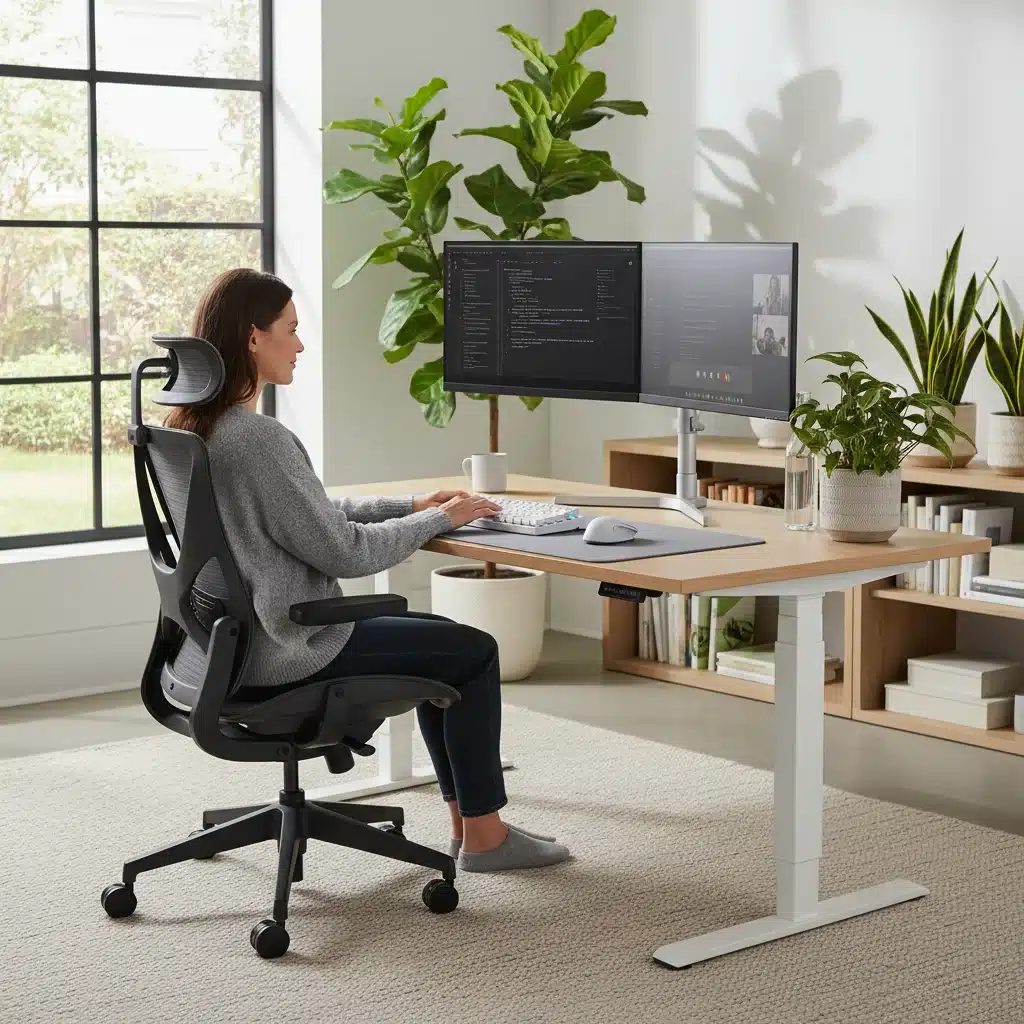
When discussing remote work ergonomics, the ergonomic chair is arguably the single most important investment. Many remote workers initially made do with dining chairs or repurposed office chairs, but for sustainable, long-term work, a high-quality ergonomic chair is non-negotiable. By 2026, this isn’t a luxury; it’s a fundamental requirement.
Why It Matters:
A good ergonomic chair provides proper lumbar support, maintaining the natural curve of your spine. It allows for adjustable height, armrests, and back recline, enabling you to customize the fit to your unique body. Without this support, prolonged sitting can lead to chronic back pain, poor posture, and increased pressure on your spinal discs. This not only impacts your physical health but also your ability to concentrate and perform effectively throughout the day.
Key Features to Look For:
- Adjustable Height: Your feet should be flat on the floor or on a footrest, with your knees at a 90-degree angle.
- Lumbar Support: A chair that supports the natural inward curve of your lower back. Some chairs offer adjustable lumbar support for personalized comfort.
- Adjustable Armrests: Armrests should allow your shoulders to relax and your elbows to be at a 90-degree angle, close to your body, supporting your forearms.
- Seat Depth and Width: Ensure there’s a 2-4 inch gap between the edge of the seat and the back of your knees. The seat should be wide enough to comfortably support your hips.
- Recline Functionality: A good recline mechanism allows for dynamic sitting, changing posture throughout the day to reduce static load on your spine.
- Swivel Base: Essential for easy movement and reaching different parts of your workstation without straining.
Implementation Tips:
When setting up your chair, take the time to adjust every feature. Sit fully back in the chair, adjust the height so your feet are flat, and then position your armrests. Experiment with the lumbar support until it feels comfortable and supportive. Remember, even the best ergonomic chair won’t help if it’s not adjusted correctly. Think of your ergonomic chair as the cornerstone of your entire remote work ergonomics strategy.
2. The Adjustable Standing Desk: Dynamic Work for Better Health
While an ergonomic chair is vital for sitting, the human body isn’t designed for prolonged static postures, whether sitting or standing. This is where the adjustable standing desk comes into play, offering the flexibility to alternate between sitting and standing throughout your workday. By 2026, these desks are no longer a niche product but a mainstream component of optimal remote work ergonomics.
Why It Matters:
Regularly changing your posture helps to mitigate the negative effects of prolonged sitting, such as poor circulation, muscle stiffness, and increased risk of chronic diseases like heart disease and diabetes. Standing desks encourage more movement, can boost energy levels, and improve focus. The ability to switch seamlessly between sitting and standing is a game-changer for overall well-being and sustained productivity.
Key Features to Look For:
- Electric Motorized Adjustment: For effortless and smooth transitions between sitting and standing heights. Manual crank desks are an option but can be cumbersome for frequent adjustments.
- Height Range: Ensure the desk can go low enough for comfortable sitting (with your chair adjusted correctly) and high enough for comfortable standing (with your elbows at a 90-degree angle, forearms parallel to the floor).
- Memory Presets: Many electric desks offer programmable height settings, allowing you to save your ideal sitting and standing positions for quick changes.
- Stability: A sturdy desk is crucial, especially when raised to standing height, to prevent wobbling that can be distracting and uncomfortable.
- Desktop Size: Choose a size that accommodates all your equipment (monitors, keyboard, mouse, documents) comfortably.
Implementation Tips:
Don’t jump straight into standing for hours. Start by standing for 15-30 minutes every hour or two, gradually increasing the duration as your body adapts. Listen to your body and alternate frequently. When standing, ensure your monitor is still at eye level and your keyboard/mouse are at a comfortable height. Consider an anti-fatigue mat to reduce strain on your feet and legs during standing periods. Integrating an adjustable standing desk is a powerful step towards superior remote work ergonomics.
3. External Monitor(s) at Eye Level: The Vision and Neck Saver
Working solely on a laptop screen, especially for extended periods, is one of the quickest ways to develop neck and eye strain. The third essential adjustment for optimal remote work ergonomics in 2026 is the use of external monitors, properly positioned at eye level.
Why It Matters:
When you look down at a laptop screen, you put significant strain on your neck and upper back. Over time, this can lead to chronic pain, headaches, and even changes in your spinal curvature. Additionally, small laptop screens can lead to eye strain and fatigue. External monitors, particularly when set up correctly, allow you to maintain a neutral neck posture and provide a larger, more comfortable viewing area, reducing eye fatigue and improving workflow efficiency.
Key Setup Considerations:
- Monitor Height: The top of your monitor screen should be at or slightly below eye level. This allows your neck to remain in a neutral, relaxed position. Use a monitor arm or a stand to achieve the correct height.
- Monitor Distance: Position the monitor at arm’s length (about 20-40 inches or 50-100 cm) from your eyes.
- Dual Monitors: If using two monitors, place the primary monitor directly in front of you. If both are used equally, position them symmetrically, with the meeting point directly in front of your nose. Angle them slightly inwards.
- Laptop Users: If using a laptop as a secondary screen, elevate it to the same height as your external monitor using a laptop stand. Consider using your external monitor as your primary display.
- Lighting: Ensure there’s no glare on your screen from windows or overhead lights. Adjust screen brightness and contrast for comfortable viewing.
Implementation Tips:
Don’t underestimate the impact of proper monitor placement on your overall remote work ergonomics. This simple adjustment can significantly alleviate neck and eye strain, contributing to a more comfortable and productive workday. Many monitor arms offer flexibility in positioning, allowing you to fine-tune the setup as needed.
4. Ergonomic Keyboard and Mouse: Protecting Your Wrists and Hands
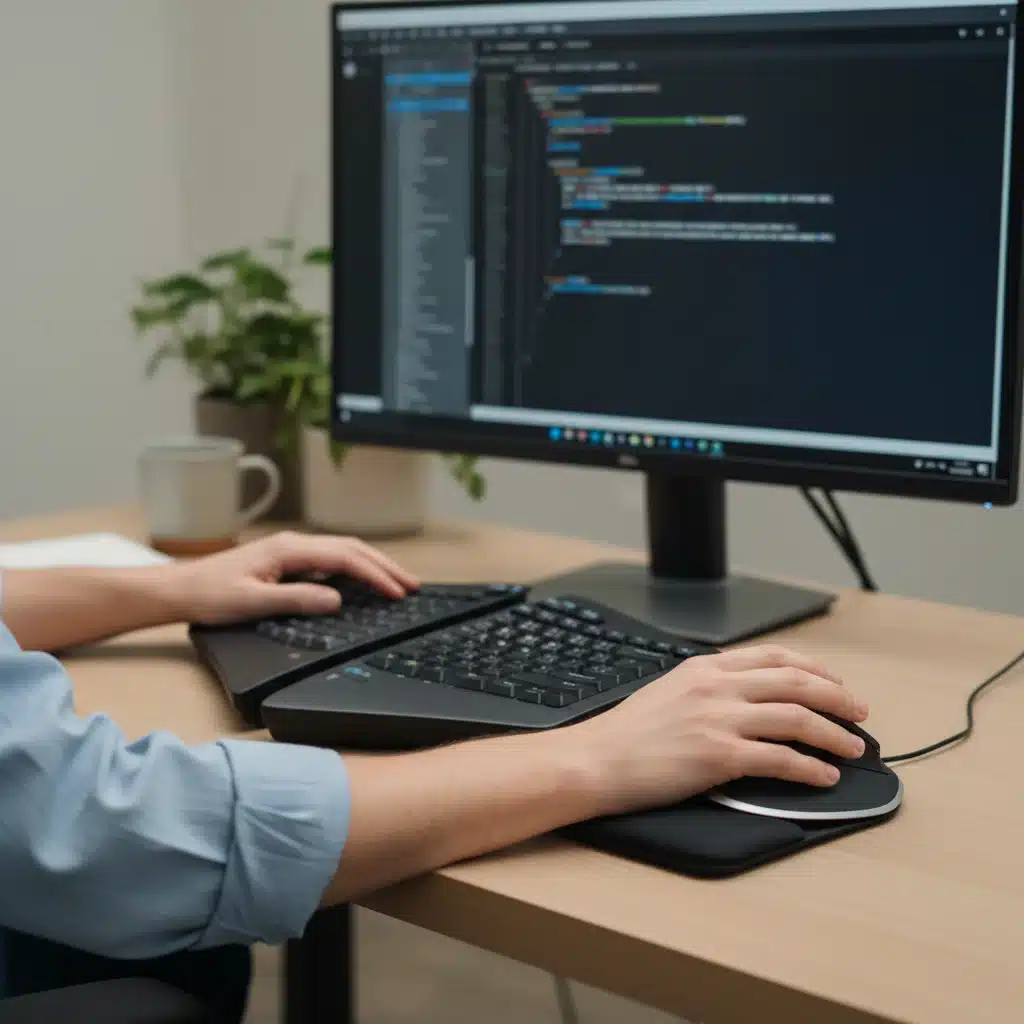
While often overlooked, your input devices – the keyboard and mouse – play a critical role in your remote work ergonomics. Standard keyboards and mice can force your wrists into unnatural positions, leading to discomfort, pain, and conditions like carpal tunnel syndrome or repetitive strain injury (RSI). For 2026, upgrading to ergonomic versions is a smart move for any US remote worker.
Why They Matter:
Ergonomic keyboards and mice are designed to promote a more natural hand, wrist, and forearm posture. They reduce pronation (palms facing down) and ulnar deviation (wrist bending outwards), which are common culprits for strain. By minimizing these awkward postures, you significantly reduce the risk of developing painful musculoskeletal disorders, ensuring you can continue working comfortably and efficiently for years to come.
Key Features to Look For:
- Ergonomic Keyboard:
- Split Design: Separates the keyboard into two halves, allowing your hands to rest at a more natural, shoulder-width distance.
- Tent Design: Raises the middle of the keyboard, reducing wrist pronation.
- Integrated Wrist Rest: Provides support for your wrists, keeping them straight and elevated.
- Key Travel and Feel: Choose keys that are comfortable to press and provide good tactile feedback.
- Ergonomic Mouse:
- Vertical Mouse: Positions your hand in a natural handshake grip, eliminating forearm twisting.
- Trackball Mouse: Reduces arm and shoulder movement, as you control the cursor with your thumb or fingers.
- Contoured Design: Fits the natural curve of your hand, providing comfortable support.
- Programmable Buttons: Can reduce repetitive clicking and allow for customized shortcuts.
Implementation Tips:
When using an ergonomic keyboard, ensure your wrists are straight and not bent upwards, downwards, or sideways. Your forearms should be parallel to the floor. For an ergonomic mouse, use your whole arm to move the mouse, not just your wrist. Experiment with different types of ergonomic mice to find one that feels most natural for your hand size and grip. These small changes in your input devices can have a monumental impact on your long-term remote work ergonomics.
5. The Power of Micro-Breaks and Movement: Beyond the Hardware
While investing in top-tier ergonomic equipment is crucial, even the best setup won’t fully protect you if you remain static for hours on end. The fifth, and arguably most dynamic, adjustment for optimal remote work ergonomics in 2026 is the consistent integration of micro-breaks and movement throughout your workday. This goes beyond just getting up for a coffee; it’s about intentional, regular movement.
Why It Matters:
Our bodies are designed for movement, not prolonged stillness. Static postures, whether sitting or standing, restrict blood flow, stiffen muscles and joints, and can lead to fatigue and discomfort. Regular micro-breaks, even just for 1-2 minutes, can significantly counteract these negative effects. They help re-energize your body, improve circulation, reduce muscle tension, and give your eyes a much-needed break from the screen. This proactive approach is fundamental to holistic remote work ergonomics.
Practical Strategies for Integration:
- The 20-20-20 Rule: Every 20 minutes, look at something 20 feet away for at least 20 seconds. This helps reduce eye strain.
- Stand Up and Stretch: Aim to stand up and move around every 30-60 minutes. Do some light stretches for your neck, shoulders, wrists, and back.
- Walk During Calls: If you’re on a phone-only meeting, take the opportunity to walk around your home or office space.
- Hydration Breaks: Use trips to refill your water bottle as a built-in movement opportunity.
- Scheduled Longer Breaks: Don’t forget to take proper lunch breaks away from your desk. Consider a short walk outdoors to refresh your mind and body.
- Ergonomic Reminders: Use apps or timers that gently remind you to take breaks and adjust your posture.
Implementation Tips:
Make movement a habit, not an afterthought. Set alarms, use productivity apps with built-in break timers, or simply make a conscious effort to stand up and stretch regularly. Encourage your remote team members to do the same. This cultural shift towards dynamic working is as important as any piece of equipment in achieving peak remote work ergonomics and overall well-being.

Beyond the Basics: Advanced Ergonomic Considerations for 2026
While the five adjustments above form the bedrock of excellent remote work ergonomics, as we move further into 2026, consider these additional refinements to truly optimize your setup:
Proper Lighting:
Good lighting is crucial for eye health. Position your desk to take advantage of natural light, but avoid direct glare. Use adjustable task lighting to illuminate your workspace without creating reflections on your screen. Avoid working in dimly lit rooms, which can cause eye strain.
Footrest:
If your feet don’t comfortably rest flat on the floor when your chair is at the correct height, a footrest is an essential addition. It helps maintain proper leg and back posture, improving circulation and reducing pressure points.
Headset for Calls:
If you spend a lot of time on calls, a good quality headset (wired or wireless) is invaluable. It prevents you from craning your neck to hold a phone and keeps your hands free, reducing strain on your neck and shoulders.
Document Holder:
If you frequently refer to physical documents, a document holder positioned between your keyboard and monitor, or next to your monitor at the same height, can prevent repetitive neck movements and eye strain.
Cable Management:
While not directly ergonomic, a tidy workspace contributes to a clear mind and reduces clutter that could interfere with proper positioning. Organize your cables to prevent tripping hazards and maintain a clean aesthetic.
Regular Self-Assessment:
Your body and your work habits may change over time. Regularly assess your setup. Are you experiencing any new aches or pains? Does anything feel uncomfortable? Be proactive in making small adjustments as needed. Think of remote work ergonomics as an ongoing process, not a one-time fix.
The Long-Term Benefits of Prioritizing Remote Work Ergonomics
Embracing these ergonomic adjustments for your remote US worker setup in 2026 isn’t just about avoiding pain; it’s about unlocking a multitude of benefits that will positively impact your professional and personal life:
- Reduced Risk of Musculoskeletal Disorders: Minimize the likelihood of developing conditions like carpal tunnel, tendonitis, and chronic back or neck pain.
- Increased Comfort and Well-being: A comfortable workspace reduces physical discomfort, allowing you to focus on your tasks rather than your aches.
- Enhanced Productivity and Focus: When you’re not distracted by pain, you can concentrate better, leading to higher quality work and increased output.
- Improved Mood and Energy Levels: Less physical strain often translates to better mood and sustained energy throughout the day, combating remote work fatigue.
- Fewer Sick Days: By preventing ergonomic-related injuries, you’ll likely experience fewer days lost to pain or doctor’s appointments.
- Long-Term Career Sustainability: Protecting your body ensures you can continue to work effectively in your chosen profession for many years to come.
The investment in proper remote work ergonomics pays dividends in every aspect of your life. It’s an investment in your health, your career, and your overall quality of life.
Conclusion: Your Ergonomic Blueprint for Remote Success in 2026
As remote work continues to evolve and solidify its place in the American professional landscape, the importance of robust remote work ergonomics cannot be overstated. For US remote workers navigating 2026 and beyond, proactively adjusting your home office setup is not merely a recommendation; it’s a strategic imperative for health, productivity, and long-term career satisfaction.
By prioritizing an ergonomic chair, integrating an adjustable standing desk, ensuring external monitors are at eye level, utilizing ergonomic input devices, and consistently incorporating micro-breaks and movement, you are building a resilient and healthy foundation for your remote work journey. These five adjustments, combined with advanced considerations like proper lighting and regular self-assessment, create an optimal working environment that supports your body and mind.
Don’t wait for discomfort or pain to force your hand. Take control of your workspace today and transform it into an ergonomic sanctuary. Your future self, free from aches and brimming with productivity, will thank you. Embrace the power of intelligent remote work ergonomics and set yourself up for unparalleled success in the dynamic world of remote employment.